
Repost license
Request authorization before reposting and retain the authorization code, original URL, and go/affiliate links.
Original URL:https://www.geekcorelab.com/post/wordpress-optimization-guide-images-pages-cdn-pure
The commercial link is an authorized go short link that must stay on the reposted page. It records the source before sending readers to the original article.
When you clicked in, you've already won
Image Optimization
Highly recommended; currently, apart from online services, there is no charge at all
“It can actually support WebP replacement?!” I was shocked at the time too
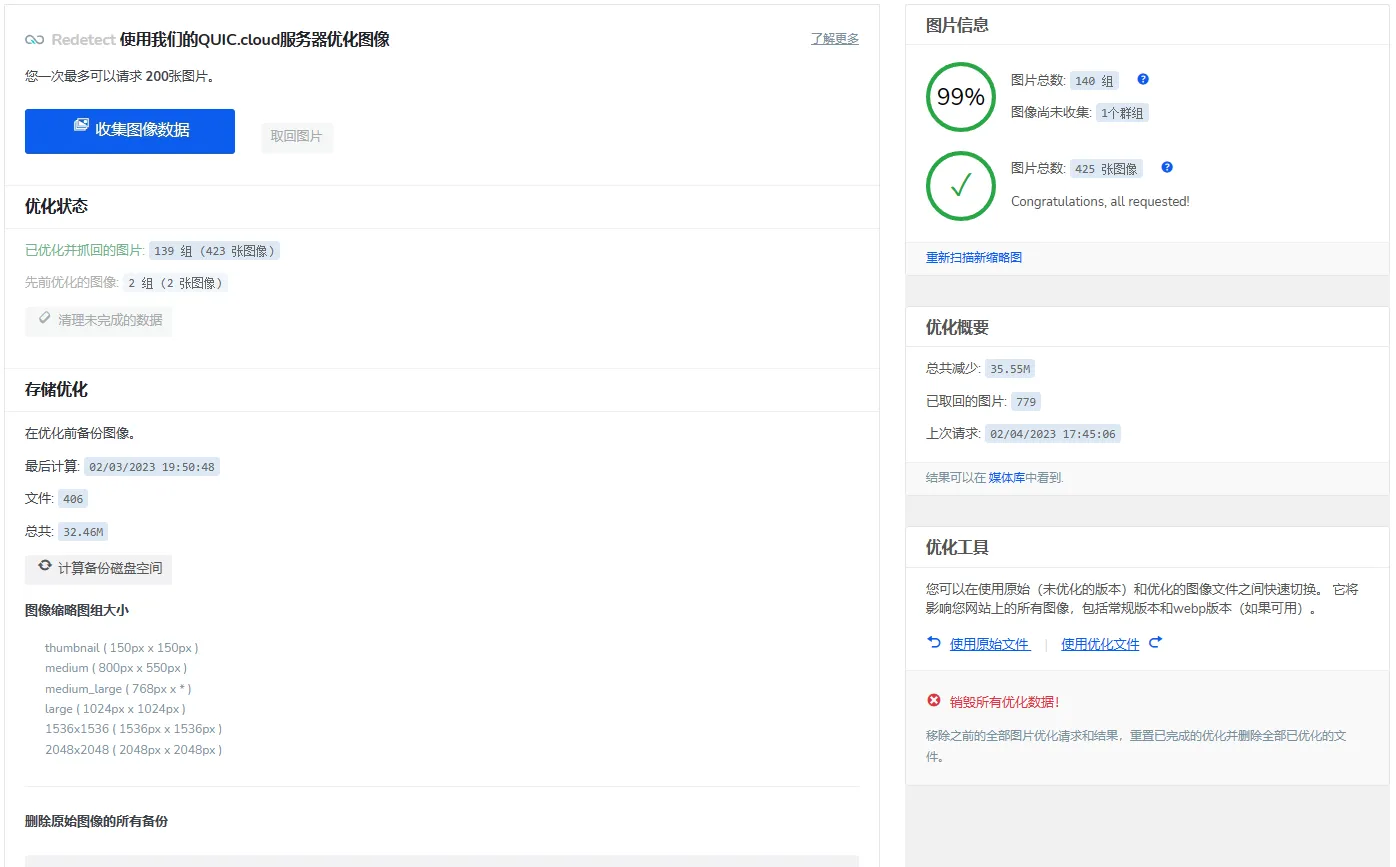
Unlimited optimization quota
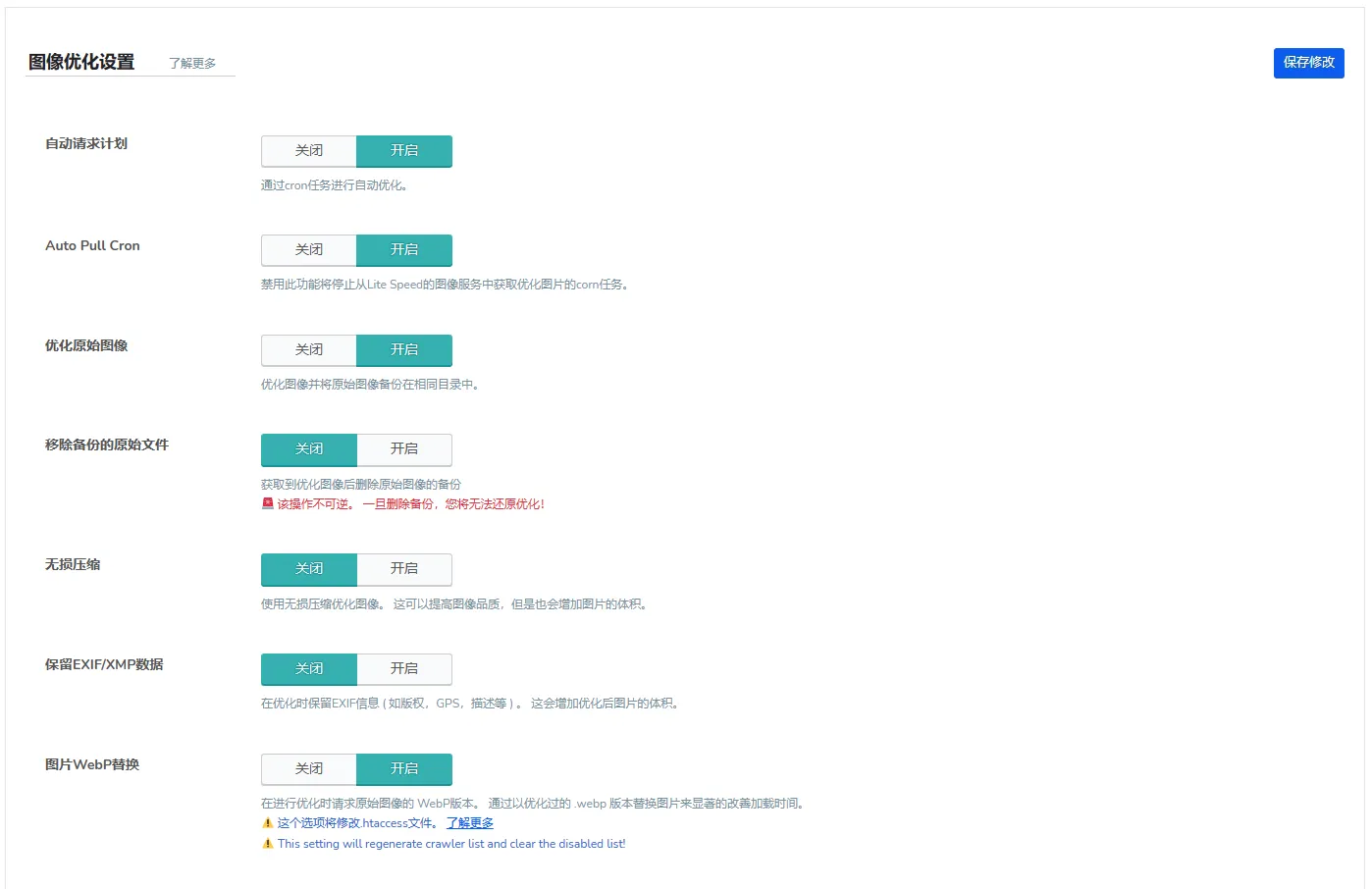
I previously searched online for many image optimization plugins that claimed to be “free.” Since I prefer using WebP format rather than png, jpg, etc., whether WebP conversion and WebP replacement are supported under the free plan became one of my main criteria for screening.
I looked at EWWW Optimizer, Imagify, Smush, Optimole, ShortPixel, etc. one after another. The people introducing these plugins even labeled them as “free,” but either there were only a pitiful 100 optimizations per month, or there were various incompatibilities. This tiny “free” quota was simply not enough for me.
The image below also shows that I have already used 479 quick-queue image optimization credits, while its quick queue only has 500.
But here comes the key point.
Its total image optimization usage is infinite. That is, after the quick queue is used up, you can still continue image optimization; it is just slower.
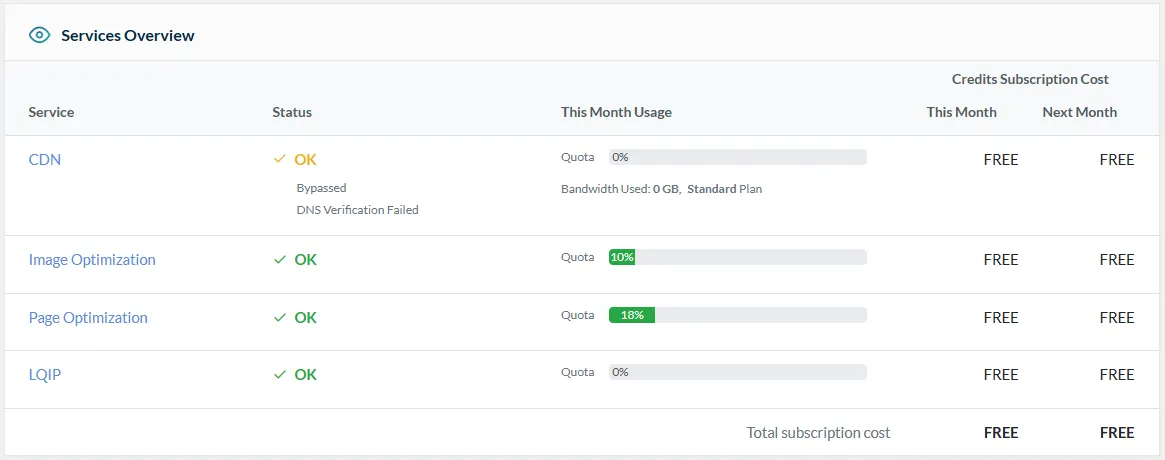
Below is a screenshot of the official website's management panel. The key is “This Month Usage,” meaning usage this month, so usage is reset every month. This means you can get it for free indefinitely. Although my website's image upload volume is much larger than when I used EWWW Optimizer, Smush, and Imagify before, it still does not reach 5,000 images uploaded per month, so the free quick-queue quota is completely sufficient.

Page Optimization
UCSS: optimize CSS size and eliminate unnecessary loading
Suppose I now globally include these CSS:
* 彩虹文字 */
.color_txt{background-image:-webkit-linear-gradient(30deg,#32c5ff 25%,#b620e0 50%,#f7b500 75%,#20e050 100%);-webkit-text-fill-color:transparent;-webkit-background-clip:text;-webkit-background-size:200% 100%;-webkit-animation:maskedAnimation 4s infinite linear;font-size:16px}@keyframes maskedAnimation{0%{background-position:0 0}100%{background-position:-100% 0}}
* h6标题美化 */
.article-content h6:before{border-bottom:2px solid #4dd0e1;width:100%;content:"";display:block;height:28px;position:absolute;left:0;top:0;bottom:-2px;margin:auto;background-size:28px 28px;background-image:url();background-repeat:no-repeat;animation:h6AnimationBefore 2s infinite alternate}.article-content h6{margin:25px 0;font-size:16px;position:relative;padding:4px 25px;width:max-content;color:#4dd0e1}.article-content h6:after{content:"";display:block;width:28px;height:28px;position:absolute;border:2px solid #4dd0e1;border-radius:50%;right:-15px;top:0;bottom:0;margin:auto;background-size:28px 28px;background-image:url();animation:h6AnimationAfter 2s infinite alternate}animation:h6AnimationAfter 2s infinite alternate}h6{display:block;font-size:1.17em;margin-block-start:1em;margin-block-end:1em;margin-inline-start:0px;margin-inline-end:0px;font-weight:bold}
  @keyframes h6AnimationBefore{0%{width:28px}25%{width:100%}50%{width:100%}to{width:100%}}@keyframes h6AnimationAfter{0%{transform:rotate(0)}10%{transform:rotate(0)}50%{transform:rotate(-1turn)}to{transform:rotate(-1turn)}}
But if I only used the first “rainbow text” on the page and did not use the h6 heading, then the CSS for the h6 heading will also be loaded. This both increases loading time and wastes traffic. Perhaps for the server it is negligible, but for users the loading time should be shorter and the cost of a full load should be lower.
At this point, you need to use this plugin's “UCSS,” i.e., critical CSS.
It can identify which CSS is not used on this page, thereby generating and caching a new UCSS file that contains only the CSS used by the page and does not include unused CSS. It can effectively reduce transfer size and optimize speed and user experience.
CDN
Although I didn't use its CDN, this is still quite appealing, mainly because my domain is already connected to Cloudflare and I don't want to change the NS servers again. If conditions allow, you can consider changing the NS servers to LiteSpeed's free CDN. It has a free quota of 100 credits per month, and credit consumption is charged according to the node used (Asia node: 80 credits per 1GB). Of course, if you can accept slightly fewer nodes, you can choose the completely free plan (in the console), but there are only 8 available nodes.
Low-Quality Image Placeholder
In fact, after enabling LazyLoad, before the original image has loaded, a very small, very low-resolution thumbnail is first placed there. After the main content of the page has finished loading, the original images are then loaded one by one and replace the low-resolution images.
Plugin Download
It is available in the WordPress plugin repository and is called “LiteSpeed Cache.” As of the publication of this article, I am using the latest version in the plugin repository, version 5.3.2.
Comments
Discussion
Be kind and keep the discussion friendly.
Discussion
0 comments