

Nginx: Force HTTPS Redirect and Add www
Repost license
Request authorization before reposting and retain the authorization code, original URL, and go/affiliate links.
Original URL:https://www.geekcorelab.com/post/nginxs-mandatory-redirect-to-https-and-add-to-www
The commercial link is an authorized go short link that must stay on the reposted page. It records the source before sending readers to the original article.
Redirect to HTTPS
Although many websites support https, when you directly enter the URL in the browser address bar, they are accessed via the http protocol by default, hence the need to force http to redirect to https arises
Use the rewrite method to force HTTPS
if ($server_port !~ 443){
    rewrite ^(/.*)$ https://$host$1 permanent;
}
Modification method
Enter the virtual host configuration file directory
View the virtual host to modify

Use the vim editor to modify the configuration file and add the above code
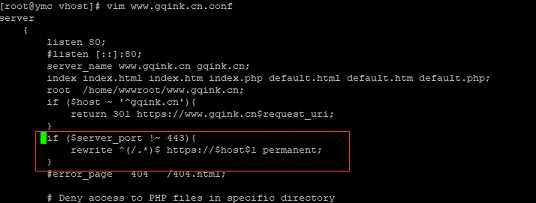
After modification, you need to restart Nginx Server for it to take effect.
Redirect to WWW
For some websites, the main domain has www added, but you can still access gqink.cn if you want to access it; then add the following code to redirect to www.biliwind.com
Use a 301 redirect to HTTPS and add www
if ($host ~ '^gqink.cn'){
    return 301 https://www.biliwind.com$request_uri;
}
Modification method
Enter the virtual host configuration file directory
View the virtual host to modify
Use the vim editor to modify the configuration file and add the above code
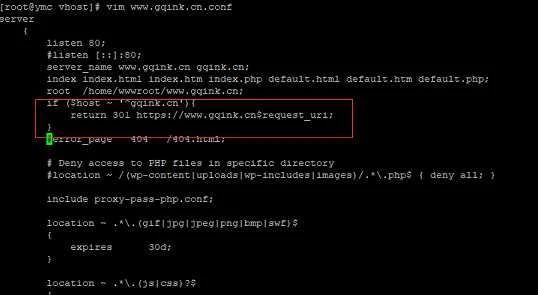
After modification, you also need to restart Nginx Server for it to take effect.
This article uses the lnmpa environment for demonstration.
Comments
Discussion
Be kind and keep the discussion friendly.
Discussion
0 comments